Showing posts with label Google. Show all posts

Reduce Memory Usage In Google Chrome - How to ?

Being a heavy Internet user I use Google chrome a lot but when number of tabs starts growing it starts slowing down system. A slow system definitely impacts your productivity. If your job is of similar nature and you spend lots of time surfing Internet here are few tips which can help you to control Google Chrome.

memory

Step 1 –  Check memory usage and their source

Most of the memory is eaten either by a opened tab or by Installed chrome add-ins.  Type “chrome://memory-redirect/” in address bar and you will be able to see the summary of memory usage by various plugins or opened websites. As a rule if you are not using any plugin and it is installed into browser you should either remove it of disable it if is used time to time or once in a while.

memory-usage

To disable chrome plugin go to menu –> tools –> Extensions

Here you will find all the chrome plugins installed. Just remove of disable plugins which as per your usage or the amount of the memory consumption you have seen in previous memory usage page.

Step 2 – Flush memory by using plugin (OneTab)

onetab

As such there is no such built in facility to flush memory in Google Chrome but this can be achieved by using one excellent plugin named OneTab. As claimed by plugin writers it can save up to 95% of memory usage and removes the clutter as well. What this plugin does is it simply closes all the opened tabs and displays one single tab where you can find links to all opened pages in Google Chrome. To re-open previously opened tab just click on the link and it will be displayed back in a new tab. Whenever you find that number of tabs have become unmanageable just click on the plugin icon.  The number of time you click OneTab icon it will display one tab page and will also group the links so that you can easily be able to find them.

Download OneTab – plugin to reduce Google Chrome Memory Usage

Unlink SMS from Google Hangout - How to ?

After a recent Google Hangout  update you will be shown a message to integrate “SMS” messages with hangout saying :

“Hangout now lets you text message (SMS).
Turn on SMS and see all your conversation in one place.”

google hangout

This sounds to be a brilliant idea as we believe in Google products and their quality. Though idea of integrating SMS is good but it doesn’t work well. It is not as smooth as the built in SMS application.

How to disable SMS integration ?

In case you have integrated SMS with hangout and now want to revert back just follow the below steps.

  • Launch Hangouts APP
  • Goto settings menu item. To do that make sure you are at Google Hangout home screen. Press the menu button ( this may vary depending upon your phone model.
  • Now, under General section tap to SMS. This will take you to another screen
  • Uncheck the checkmark where Turn on SMS is written.

Above steps can be checked in image below :

google hangout sms

In case you want to re-enable the integration. Just follow the same steps above and Check Turn on SMS.

Google Panda - Small Sites 21st August 2013 Hits Microsoft & Other Giants Too

Although there is no official word about this update but several websites and forums are buzzing with traffic drop issues. I was also not sure what is happening to my web applications as there was a significant drop in the traffic ( almost 90 %).  Finally I came to www.fruition.net which confirmed that there was some update released on Aug 21, 2013.

An analysis done by fruition.net has also confirmed that my site was hit.  

gogle-panda-hit

Probably big Giants like Microsoft, engadget, extremetech seems to have also been impacted by this Google update.  All websites show a keyword drop on 3rd September which can’t be just a coincidence.

Semrush.com keyword analysis says that :

  • Microsoft.com lost 650,000 keywords on 3rd Sept, 2013
  • extremetech lost 22,350 keywords on 3rd Sept, 2013
  • engadget lost 152,729 keywords on 3rd Sept, 2013

I might be wrong but some has definitely happened.  If you are aware of this please comment.


microsoft-lost-keywords

extremetech

engadget

Free Android App To Send Scheduled Messages

There should be people who have scheduled time and set alarm to send a message - either by SMS, Facebook or Twitter.  Here free App Schemes comes into play. Schemes can be used to leave messages send scheduled messages. In addition to Facebook, Twitter and Gmail SMS is also supported.

message-schedulingscheduling2

Currently Schemes is in BETA stage but still it can do a lot for you.

Features of Schemes :

  • Send scheduled SMS, Facebook statuses, Tweets or Emails from your device!
  • Clean Holo UI
  • Notifications on sending
  • All messages are added to their respective threads in the Messaging app
  • Cancelable messages
  • And more!

Download message scheduling App Schemes from Google Play

Notes Taking App from Google - Google Keep

It has its own operating system, maps, browser, application, book reading, book, browser and a pile of other applications as well, but for some reason, Google has avoided making applications Note. Interesting, when you consider that almost every OS in town comes with its own application to allow users to capture these thoughts on the ear and points that can not wait for an office suite to be launched . Well, this changes with the arrival of Google keep a note-taking application for Android that can also run on the Web.

google-keep0google-keep2.jpggoogle-keep1

Google Keep is currently available for mobile devices running Android 4.0.3 and above, keep Google is a relatively lightweight application around 1.5 MB and in the best tradition of Google. Installation happens quite quickly and once done, a yellow icon instead of keeping it on your Android device.

In terms of usage, the dungeon is incredibly simple, once you have logged into your Google account. The "Add a quick note" option is available right at the top of the application, allowing you to enter the note taking immediately. You can add a title to the note, if you wish, or just type away in the copy of the main body. You can also add a picture, record your voice and throw them in the boxes, if you make a list with the items that must be checked. Note formatting options are limited to the colors, which are seven in number at present.

Importance of different shades becomes apparent when you start the application, because the default view shows you your notes in a display of two columns (you can change this to a single column one if you wish), in all their colorful eyes, make the screen look so much like a landing board Post-it relatively well organized. You can store notes, share them through email and social networks and even access from your Google Drive account in your browser. A handy widget to app can also be parked on your home screen, allowing you to browse your notes and make new without the head of the application itself. All thanks to a very simple, clean interface and uncomplicated.

So far it doesn’t seems to be very overwhelming, probably in near future this may also grow up and distinguish itself from other popular notes taking Apps Like Evernote, One Note etc.

Download Google Keep from play store or use it from web browser

Official Blog: Introducing the Glass Collective

Glass is a potentially transformative technology. It’s a window into the world’s information, and a new way to share experiences with those you care about. :

glass-collective

Find more detail at

60,000 Apps Have Been Removed From Google Marketplace

In a single month more than 60,000 apps have been removed from the Google Marketplace Google Play, reports TechCrunch . Thus, the clean-up in February reached a new high. According to the report, these were mainly to Apps that are not compliant with Google guidelines. A small portion, however, was withdrawn by the manufacturers themselves Apps. Google will from time to time such cleanups, because in contrast to the App Store from Apple to Google, there are no approval process for the preparation of apps. The current mega action was obviously in the preparation of the new version of Google Play.

google-play-small

Google Play presented 4.0
The long been discussed in the rumor mill version 4.0 of Google Play was released recently. The roll-out will take place gradually, so not all Google users can see the improved music service and experience. Most important improvement is that the new store is less text-heavy and for more graphics are used. Even the check-out process to take place much faster than before. "Prepare yourself for a simpler Google Play before," according to a Google blog .

Google offers free QuickOffice on iOS and Android

Google trumps Microsoft offering its free office suite on iOS and Android for customers of Google Apps for Business.  While the mobile version of Microsoft Office is not forthcoming, Google decided to fill a void. It offers users of smartphones and tablets running Android and iOS using this free office suite. The only condition, size, is that this offer is only available to customers of Google Apps for Business.

quickoffice

Google has acquired this application in June 2012. Initially, it appeared as a mobile solution for users of the Microsoft Office suite. Quick Office makes it possible to edit on mobile devices files created with Word, Excel or PowerPoint.

In making this offer, Google frontal attack the father of Windows. Rumors evoked the launch of a mobile version of Office for March 2013. In 2012, tests were even mentioned. The Redmond company has quickly denied the rumors. This decision was strongly criticized by financial analysts believe that Microsoft missed an estimated $ 2.5 billion per year income. One of these observers believed there is little that this strategy is a costly mistake.

Official Blog: Introducing Art Talks on Google+

Starting from Tomorrow 6th March 2013 “Art Talks,” a series of Hangouts on Air on Google Art Project Google+ page. Each month, curators, museum directors, historians and educators from some of the world’s most renowned cultural institutions will reveal the hidden stories behind particular works, examine the curation process and provide insights into particular masterpieces or artists.

Tower of Babel

The first guided visit will be held this Wednesday, March 6 at 8pm ET from The Museum of Modern Art. Deborah Howes, Director of Digital Learning, along with a panel of artists and students, will discuss how to teach art online. To post a question, visit the event page. If this talk falls too late for you to tune in live, you can watch afterward on our Google Art Project YouTube channel.

Read more at Official Google Blog

HTML Table to CSV Export Plugin for Google Chrome

Table2CSV - An utility plugin for Google Chrome browser which lets you export HTML tables in CSV format in an easy way. After you click on the plugin button all the tables in the webpage will be marked with export link. A click on the export link will display CSV data in a dialog which you can easily copy and use anywhere. A re-click on the HTML to CSV icon and will hide all the export links.

html-table-2-csv

Table2CSV plugin is available for download at Google Chrome marketplace.

Now Take a Walk at Kennedy Space Center with Google Street View

A good news for space enthusiasts, the collaboration between NASA and Google Street View is enabling people around the world to take a view around the Wold famous Kennedy Space Center. One of the most active and amazing place in the world providing a doorway to space has been added to special collection of Street View imagery to date, totaling 6,000 panoramic views of the facilities.

nasa-google-street-view

nasa-google-street-view2

Here are some popular links at the space center :

Restore Deleted Thumbnail From Google Chrome New Tab

Accidently I deleted one of my most frequently used thumbnail “Google” and for two day’s I couldn't not find any solution until I Googled on web.  A very tricky solution to restore deleted thumbnail bookmark or the most visited bookmark from new tab.

You just need to delete another thumbnail by clicking at the right top cross icon. Similar to below picture you will see an option to “Restore all” thumbnails at the top left of the scree. Just click the restore link and arrange your thumbnail as you want.

google-chrome-restore-deleted-thumbnail

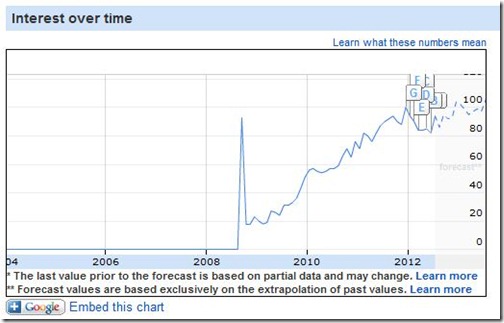
Looking back few years in Google Insight gives nice preview of the history, how  Google managed to reach among top 3 position. In earlier days we use to have one or two release of Internet Explorer in a year or two. But, now trend has changed. You now keep on getting updates automatically and don’t realize what exactly has changes ( until you are too techie and keep an eye on the chrome development).

google-chrome-google-insight

The point here is small things does matter and a smooth end user experience matters a lot to win. Although it not very critical but having an option to manage your bookmarks will definitely help a lot.

Google Nexus 7 May Land Into Trouble After Nokia Claims On Patent Infringement

The tablet 'Nexus 7' is the first device created for version 4.1 of Android Jelly Bean, and ASUS combines design with the latest Android OS and Google Play Entertainment .

Google_Nexus7

It is a tablet of 7-inch in size, 1280x800 pixel resolution, a Tegra processor 3 four GPU cores supported by twelve . According to the company, they will offer "the best of Google." It will also including Wi-Fi, Bluetooth, gyroscope and accelerometer. The company explains that the design 4-PLUS-1 processor extends battery life and offers maximum performance depending on the application is running. As a launch promotion, and for a limited time, the "Nexus 7" will come with $ 25 credit for Google to acquire entertainment Play .

Nokia claims the Nexus 7 infringes its patents

The Finnish company Nokia claims that Nexus 7 violates several of their licenses, particularly those related to the IEEE 802.11 Wi-Fi on. Previously the U.S. company said tablet Apple sued for patent violation.

According to the sources, Nokia said that "Nexus 7" violates 40 of its patents. The Finnish company has a list of manufacturers who access their licenses, but neither ASUS nor Google are on that list. Nokia has stated that " simply must come and register for a license . " So far neither ASUS or Google itself have wanted to speak to allegations of Nokia.

Still there are lots of things where Google can improve

If we look back past 10 years in Search Engines History, there is a lot to say the way Google has changed our lives. For almost every information we rely on Google search results.  I can’t say much about the other industries, but software developers are very much dependent on Google now a days.

Many times, while doing my regular activities on which most of them are related to either software development and finding competitive prices I have noticed that Google search results shows very stale information. For ex. a search on Google.co.in for term “nokia phone ranging 1000” displays information which is too much irrelevant for today. Why would I be interested on price list which was discussed around 5 years ago.

google-search

I do agree that doing an advance search in Google by applying date range filters can result latest information, but don’t think a common man ever uses advanced search features. Similar kind of incidents I do see while looking for references for software libraries and documentations. You will find lots of old information which has become stale and should not be given preference than the latest version of documentation.

I don’t see Google as an exception. No software can be said to be 100% bug free and without any scope for improvement. So … is the case with Google search engine. 

How to Remove Password from PDF Document

There are several freeware available which can be used to remove password set in a PDF document. The trick I am going to describe here uses Google Chrome to re-create the unprotected PDF document. As I have mentioned in my one of earlier posts that newer versions of Google chrome is capable of converting HTML to PDF. One thing is important that you must know the password to open the PDF.

unprotect-pdf-files

To remove the password follow below steps :

  • Open the PDF file in Google chrome. You can simply drag and drop the file inside chrome to open it.
  • If your PDF document is password protected it will ask for the password to open it.
  • Enter the correct password and open the document.
  • Now go to print. This can be selected from shortcut menu or from top toolbar button.
  • Inside the Print window select "Destination" as "Save as PDF" and click Save button.
  • You will be asked to save the file, save it to any location you want.
  • Saved file will be password free.

Google Instant Upload Might Be Secretly Uploading Your Images At Google Plus Social Networking

I was surprised to see one of my online payment receipt snap at Google+. After exploring I found more snaps which were not intended to be shared with public. It took a while to me to understand that the culprit is Google Plus, which is automatically synching the videos and images taken from your Android phone to Social web.

Why this happened? the answer is – By default Google Plus Android application is set to upload photos and videos online. This feature is known as “Google Instant Upload “. This is really bad part from Google Engineers who probably didn’t apply the common sense that all snaps and videos are not always intended for public  or social networks. This option should have been set with Auto Synch as disabled.

So… how to get rid of this thing? To disable Google Instant Upload follow below steps :

  • Go to Google Plus Android App
  • Select Settings From the Program Menu
  • Uncheck the “Enable Instant Upload” option

disable-google-instant-upload

Uploaded photos can be deleted from you Google Plus profile from “Photos from your phone” section.

Google Instant May Land You In Trouble - see here how?

Google Instant search is a search feature which displays shows results as you type.  Google claims that by predicting your search and showing results before you finish typing, Google Instant can save 2-5 seconds per search.

What today happened with me was really annoying and the same could be problematic for anyone. To test this, start tying “How to “ and .. my god .. smart Google ( which they claims) has predicted “How to kiss” and displayed the results instantly. Inline images enhancement added some more fuel to it. I could see some to some kissing images .. eh .. that’s too bad, at least when I am at work. I really did not wanted to search that. Instead, I was searching "how to upload find using ajax”, a simple programming solution at the Google.

google-instant-

One might claim that I should have turned on the safe search feature. Try that and you will find you are looking for “How to get pregnant”. Totally absurd!

Some of the FAQ at Google instant page with my views

  • Before Google Instant, the typical searcher took more than 9 seconds to enter a search term, and we saw many examples of searches that took 30-90 seconds to type.
    * It hardly matters to me. Google Instant poses more distraction with absurd predictions.
  • Using Google Instant can save 2-5 seconds per search.
    * Same as above.
  • If everyone uses Google Instant globally, we estimate this will save more than 3.5 billion seconds a day. That’s 11 hours saved every second.
    * More unnecessary searches and more consumption of energy.
  • 15 new technologies contribute to Google Instant functionality.
    * It hardly matters to more than 95% of the users what technology they are using. 

How to turn off Google Instant

Visit Google search preferences and turn of by selecting the last option.

google-instant-turn-off

No doubt Google is the very much needed to day to day activities. But, too many search enhancements are probably killing the search engine. They should have a separate version free from all enhancements.

Just type in “Let it snow” in Google Search

Just type of Google .. “Let it snow” and see the amazing animation and snowflakes effect.

google-let-it-snow

Your screen will be filled with smoke and you will also be able to see falling snowflakes right into you web browser. Really cool .. isn't’ it?

Apture acquired by Google

This morning I received and email from Apture team informing that Aparture is joining Google and from October 20th they will discontinue  their popular in page search widgets.

Apture

As per their email :

On December 20 we will discontinue Apture's product and services. When this happens, users will no longer be able to highlight and search terms with Apture on your web pages. Your website will continue to work as normal even after our service is suspended; however, you are free to remove the Apture <script> code from your site as well.

As per the information published at Apture website, Google Chrome team  continue driving innovation and creating a better user experience on the web. Probably Google is planning to integrate Apture’s  in page search feature into its browser.

Find more information at Apture website.

Fun with Google+ : Google introduces games

Google has added a new flavour to Google+ i.e. Games. Not sute how it is going to be useful to beat the rival Facebook. I personally favour Google, becuase my daily life reveolves around the best thing Google gave to us (Google Search), but still I don't see any reason to switch to Google+. Probably there is nothing extra which FB is not giving or FB is good enough that there is not need to switch.

games_homepage_screenshot

Anyways... I might try games if I could find something cool for my 3.5 years kid else big NO to this feature. There are several other sites where I can play games if I want.