Showing posts with label Android. Show all posts

Word Swipe Game - Word puzzle game for Android mobile

Word Swipe – Addictive Word Puzzle Game for all age groups
word-swipe-game-word-power

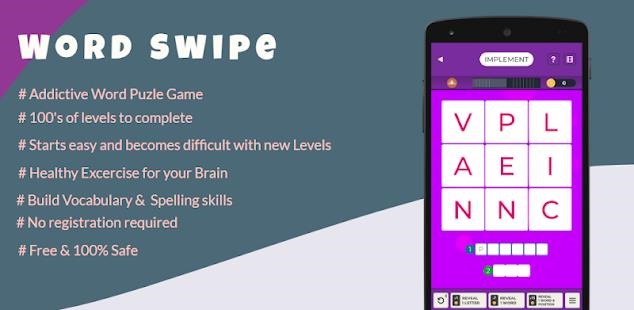
If you are looking for an Addictive word puzzle game Word Swipe is the right one for you. This game starts with an easy mode and gets difficult as you go on finishing levels. Words can be made by swiping and connecting letters in each possible direction keeping in mind that the same letter can be used to make other words too. Word Swipe is a wonderful new game to test your word search skills, the perfect game for puzzle lovers!

Exercise For Your Brain

Word Swipe is a modern word game that requires extensive logic to search and complete the word puzzle to complete the level. Word swipe puzzles are a tremendous brain challenging fun!

How to play Word Power Game?

You will be required to swipe your finger horizontally, vertically, diagonally, forwards or backwards to find the specific hidden words in the letter grid. With more than 1200 well designed levels in 2×2, 3×3, 4×4, 5×5 and 6×6 format – be warned that the game may start easy but soon becomes difficult!

Features of Word Swipe Game :

* FREE word game
* Find the specific hidden words in the grid.
* Swipe up, down, left, right and diagonally to make your guesses.
* Use the hint button if you get stuck!
* Fun for all of the family!

The Word Puzzle Game can be downloaded from Google Play Store.

JLPT N5 vocabulary Practice - JLPT N5 Test Preparation App

Play games is the best way to learn and remember Japanese Vocabulary. If you are looking for an app to learn and test Japanese vocabulary JLPT N5 level. This app is a free app to help you learn Japanese vocabulary.


JLPT N5 Vocabulary Game is an easy way to learn Japanese words and can build vocabulary by just playing game. JLPT N5 Word game comes with several features :

  • Fun and learn Japanese words
  • Comes with 10 different levels
  • More than 500 words to learn
  • Easy to memorize while playing
  • In between hints when one gets struck
  • Word meaning along with Hiragana, Katakana , Kanji & Furigana
  • Prepare for JLPT N5 Exams

Download N5 Vocabulary App from Google Play Store :


Mobile Network Switcher APP - 2G 3G 4G LTE Switcher

 2G 3G 4G LTE Switcher app lets you toggle between 2G,3G,LTE,4G and 5G modes. It actually opens the built in network setting screen but saves your 2-3 taps each time. If you frequently toggle between 2G/3G/4G/5G or LTE mode, this application might save some of your clicks.


This application also comes with many built in network utilities :

  • Advanced Network Switcher
  • Network Speed Tester
  • Network Ping Tester
  • IP  Information
  • Internet usage information

Download 2G / 3G/ 4G/ LTE Switcher app form Google Play Store

Image to Text Converter App for Android

If you are looking for an app to convert snaps taken from a book or you want to convert any printed material to Text, you can simply use Image to Text Converter App for Android Mobiles.

image-to-text-converter

Simplest Image to Text Converter App ( OCR ) allows you to extract and share textual content from any images / documents having english text written over it. It can be any phone numbers, urls, book content or anything. If you already have an images from which you want to extract text simply choose the Image and start the OCR process. Extracted text will be displayed in a seperate widow where you make corrections. You can also use camera of your mobile phone to take the picture and scan the text from it.

From OCR Scan Results you can :

  • Send the scanned content by email
  • Share it with any app includine instagram, Facebook or Whatsapp
  • Copy text to the Clipboard so that it can be pasted to any other app
  • Extracted text can also be shared with Google Translate app ( if installed )for translation

Features of Image to Text Converter :

  • Extract any English text from Images or documents
  • You can also use phone camera to scan Text from Anything
  • Translate exracted using Google Transate
  • Take Screenshot and Copy Text from mobile Screen
  • Crop and fine-tune images before text extraction
  • Edit & Share OCR result with Whatsapp, Facebook, Google Keep and any other app whcih allows text content sharing.
  • Safe and secure - no login or registration required

Download Image to Text Extractor

This OCR app is free of cost and is available for download at Google Play Store.


Android two-factor authentication apps

One-time passwords from SMS, which are usually used for two-step authentication (2FA) to any services, are not secure. They can be spied on or intercepted. The most reliable alternative is authenticator apps.

How Authenticator Apps Work :

  • Install the application on your smartphone.
  • In the service's security settings, find the option to enable two-factor authentication.
  • Choose two-factor authentication using the app.
  • The service will display a QR code that can be scanned in a 2FA application.
  • Scan the code by the application and it starts generating a new one-time code every 30 seconds.

One-time codes are synchronously generated and synchronized based on a key that is known only to your device and server, as well as the current time, rounded up to 30 seconds. This algorithm is called OATH TOTP (Time-based One-time Password).

Typically, two-factor authentication applications work with the same algorithm, so they can be used in almost any service. In this article, I have identified two of the most popular and convenient, as well as one alternative.


Google Authenticator

Google Authenticator is a free 2FA app from Google for iOS and Android users.

Download: Google Authenticator for  Android


Twilio Authy 2-Factor Authentication

Authy is an alternative to Google Authenticator for iOS and Android. Authy has the advantage over most 2FA app options - you can sync your accounts across multiple devices.


Usually, if you want to change your smartphone, then you need to back up the settings and transfer data about your 2FA application manually. This can take a long time. Also, if someone steals your phone, your codes and 2FA accounts will be gone. Authy fixes this problem with a secure backup system. This means you can transfer your Authy 2FA accounts between devices.

Download:  Authy for  Android

Good Morning App Download - Good Morning Images Android App

Daily Good Morning Images & Wishes for your friends, family members & loved ones !!
Enjoy daily beautiful Good Morning Images of Flowers, Landscapes, Kids, Birds and many more beautiful things of nature. We have a huge collection of Good Morning Pictures which you can wish your friends & family everyday.

Good Morning Messages


Good Morning Messages for Whatsapp


Join our Facebook page for daily Good Morning Images
Good Morning Images  Facebook Page
It's time for fun and enjoy, spread the joy with fabulous Good Morning Images with your loved ones !!
Main Features of Good Morning Image App:
============
  • Large collection of Good Morning Images
  • Good Morning Quotes with Pictures
  • Small in size .. Just 2MB
  • Save & share Good Morning Images to you family and friends.
  • Share Good Morning Images on Facebook and What'sApp
  • Its totally free and easy to use.
  • Quick Share: Quickly share Images on popular social networks.
  • Good Morning Pictures collection is updated on daily basis
Download Good Morning Images App form Google Play Store Good Morning Images Download || Download Good Morning Quotes from Pintrest.com or Best Good Morning Images

Transfer photos from Android to Windows using Wi-Fi

Cool Photo Transfer is an application to transfer pictures from your Android device to your computer Windows. Best thing about Cool Photo is that now transferring photos are a real fun and you need not not look for cable to connect to your PC. This app does all over Wi-Fi connection. Most of us take photos using mobile phone but small screen of mobiles are not always efficient for viewing photos and here Cool Photo comes to rescue.

android wifi photo transfer

How to transfer photos over Wi-Fi ?

To start using the tool first downloads it on your Windows computer and Android device, then you'll have to connect your computer and mobile device to the Wi-Fi network , now run the client from the computer and have to follow the instructions for transfer.

image

Before transferring photos from mobile to PC or Laptop you need to connect with server application from from your mobile Cool Photo App. You can make the connection manually specifying the IP address of the connection or use the automatic connection mode. The tool will link both devices from the computer. Once the connection is successfully performed, and you can start transferring photos with your finger gestures.

image

As you can see using Cool Photo Transfer is simple and does the job fully, but only works with Windows and Android. Cool Photo Transfer is a free application (with watermark) available for Android devices. Although there is a commercial version that offers transfer of voice and not transfer shows a watermark at the top of each photograph.

image

Cool Photos windows Application and Android App can be downloaded from below links :

Download Android App  | Download Window Server

Free Android App To Send Scheduled Messages

There should be people who have scheduled time and set alarm to send a message - either by SMS, Facebook or Twitter.  Here free App Schemes comes into play. Schemes can be used to leave messages send scheduled messages. In addition to Facebook, Twitter and Gmail SMS is also supported.

message-schedulingscheduling2

Currently Schemes is in BETA stage but still it can do a lot for you.

Features of Schemes :

  • Send scheduled SMS, Facebook statuses, Tweets or Emails from your device!
  • Clean Holo UI
  • Notifications on sending
  • All messages are added to their respective threads in the Messaging app
  • Cancelable messages
  • And more!

Download message scheduling App Schemes from Google Play

Notes Taking App from Google - Google Keep

It has its own operating system, maps, browser, application, book reading, book, browser and a pile of other applications as well, but for some reason, Google has avoided making applications Note. Interesting, when you consider that almost every OS in town comes with its own application to allow users to capture these thoughts on the ear and points that can not wait for an office suite to be launched . Well, this changes with the arrival of Google keep a note-taking application for Android that can also run on the Web.

google-keep0google-keep2.jpggoogle-keep1

Google Keep is currently available for mobile devices running Android 4.0.3 and above, keep Google is a relatively lightweight application around 1.5 MB and in the best tradition of Google. Installation happens quite quickly and once done, a yellow icon instead of keeping it on your Android device.

In terms of usage, the dungeon is incredibly simple, once you have logged into your Google account. The "Add a quick note" option is available right at the top of the application, allowing you to enter the note taking immediately. You can add a title to the note, if you wish, or just type away in the copy of the main body. You can also add a picture, record your voice and throw them in the boxes, if you make a list with the items that must be checked. Note formatting options are limited to the colors, which are seven in number at present.

Importance of different shades becomes apparent when you start the application, because the default view shows you your notes in a display of two columns (you can change this to a single column one if you wish), in all their colorful eyes, make the screen look so much like a landing board Post-it relatively well organized. You can store notes, share them through email and social networks and even access from your Google Drive account in your browser. A handy widget to app can also be parked on your home screen, allowing you to browse your notes and make new without the head of the application itself. All thanks to a very simple, clean interface and uncomplicated.

So far it doesn’t seems to be very overwhelming, probably in near future this may also grow up and distinguish itself from other popular notes taking Apps Like Evernote, One Note etc.

Download Google Keep from play store or use it from web browser

60,000 Apps Have Been Removed From Google Marketplace

In a single month more than 60,000 apps have been removed from the Google Marketplace Google Play, reports TechCrunch . Thus, the clean-up in February reached a new high. According to the report, these were mainly to Apps that are not compliant with Google guidelines. A small portion, however, was withdrawn by the manufacturers themselves Apps. Google will from time to time such cleanups, because in contrast to the App Store from Apple to Google, there are no approval process for the preparation of apps. The current mega action was obviously in the preparation of the new version of Google Play.

google-play-small

Google Play presented 4.0
The long been discussed in the rumor mill version 4.0 of Google Play was released recently. The roll-out will take place gradually, so not all Google users can see the improved music service and experience. Most important improvement is that the new store is less text-heavy and for more graphics are used. Even the check-out process to take place much faster than before. "Prepare yourself for a simpler Google Play before," according to a Google blog .

Google offers free QuickOffice on iOS and Android

Google trumps Microsoft offering its free office suite on iOS and Android for customers of Google Apps for Business.  While the mobile version of Microsoft Office is not forthcoming, Google decided to fill a void. It offers users of smartphones and tablets running Android and iOS using this free office suite. The only condition, size, is that this offer is only available to customers of Google Apps for Business.

quickoffice

Google has acquired this application in June 2012. Initially, it appeared as a mobile solution for users of the Microsoft Office suite. Quick Office makes it possible to edit on mobile devices files created with Word, Excel or PowerPoint.

In making this offer, Google frontal attack the father of Windows. Rumors evoked the launch of a mobile version of Office for March 2013. In 2012, tests were even mentioned. The Redmond company has quickly denied the rumors. This decision was strongly criticized by financial analysts believe that Microsoft missed an estimated $ 2.5 billion per year income. One of these observers believed there is little that this strategy is a costly mistake.

Learn New Languages From Your Android Device

Learning languages ​​is certainly ideal for finding a job if left to develop ourselves abroad. Although English language is most popular and Global language but learning others (Spanish,Genman,French etc.)  would definitely add some pointed to your Job profile.  The problem which comes often is that we do not have time or money to study it.

babbel-language-toolkit

Babbel is a website that offers a free chance to learn multiple languages ​​from a basic to an advanced level . But not only that but also now has launched an application for Android system for free through which you can learn one or more languages ​​from your Android device.

These are some of the features of the mobile App:

  • 3,000 words with images, pronunciation as well as an example sentence.
  • Voice recognition for pronunciation exercises
  • Offline mode.
  • Basic vocabulary and advanced English.
  • Optimized for tablets
  • Intelligent System review

Babbel is definitely not going to do wonder for you, but at least you will be able to start learning it conveniently on your own.

Download Mobile Language Learning tool from Babbel.

Street Walk - Android App to walk around the popular places of the world

Street Walk is a free Andorid app which lets you roam freely around the world with ease and convenience at home. It comes with a pre-populated list of amazing places from all over the world and also lets you search for new places. Using search button you can find new locations and can also bookmark them.

streetwalk-android-appstreetwalk-android-app2

Street Walk uses Google Streetview to show locations and require a good internet connection to get best of it.  Popular destinations which are are available at Google Streetview gallery can also be viewed from Street Walk.  These categories are :

  • Ocean
  • Antarctica Scenic
  • Hawaii World
  • Wonders Project
  • Amazon
  • Swiss Alps
  • Seven Continents of Street View
  • Art Project
  • Discover Israel
  • Historic Italy
  • UNESCO World Heritage
  • US Highlights
  • Business Highlights
  • Parks of the World
  • Ski Resorts and Slopes
  • World Landmarks
  • University Campuses
  • Russian Highlights
  • Thailand Highlights
  • Poland Highlights
  • USA Summer Attractions
  • California National Parks
  • NASA

Street Walk Android app can be downloaded from Google Market Place.

Upgrade China Tablet Apad m300 to Android 2.1 - How to ?

By chance I stumbled into a forum post where someone was looking for an upgrade to his m300 tablet to newer version of Android and suddenly I remembered that my m300 also requires an update as it is running on a very old version of Android 1.6 eh.. So I Googled here and there and finally able to find some working firmware updates for Apad m300. Probably the manufacturer has stopped supporting this device, you won’t be able to find working download links. Few which I was able to locate is available at 4shared.com. Do a search for “M003_2.1_128” and download the file. File which I downloaded was M003_2.1_128.rar.

Upgrading firmware is pretty easy, just follow below steps :

  • Step1 – Make one SDCard ready which should be FAT32 formatted.
  • Step2 – Extract the downloaded archive (.zip or .rar) to your PC . You will find one script folder inside it.
  • Step4 – Copy the extracted script folder at the root of the SDCard.
  • Step5 – Insert the SDCard into your Apad m300 device and power it on.

You will notice that Android upgrade has started. A similar screen to below snap will be shown to your device. Just wait for few minutes and let installer complete its job. After it is done you will be asked to take of SDCard out, just remove it and power on your device again. WOW .. you are done .. you device must be running on Android 2.1 by now.

apad-m003-firmware-upgrade

If you see the newer screen you will notice that icons and layout has bee changed  and a swipe button is also available after power on. I have also noticed little performance improvement and slight better touch sensitivity with new update.

apad-m003-firmware-upgrade (2)

In my next R&D I’ll try updating m009 device firmware which is probably Android version 2.2. Someone has posted that it is working fine except wifi issue.

HTML to PDF Converter v2.0 released

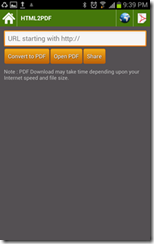
A major upgrade from last release of HTML to PDF converter for Android. One of the biggest drawback of HTML based UI is slugginess which takes away the user experience. Latest App uses Android based UI to download converted PDF file from http://www.pdf.gen.in , another improvement done is to display download progress and size of the file.

Screenshot_2012-11-09-21-39-09Screenshot_2012-11-04-15-01-15

Screenshot_2012-11-09-21-38-13Screenshot_2012-11-09-21-38-30

After download PDF file can be viewed using Open PDF button and can also be shared with different file sharing applications registered with your Android device. Previously used web interface has also been preserved and can be accessed from the top navigation bar web icon. A third icon is also available at the top navigation which can be used to view previously downloaded files. Few improvements which are to be done in upcoming version is to allow the user delete PDF files and also facility to share from PDF file listing.

HTML to PDF Converter v 2.0 can be downloaded from Android Market Place for free.

Transfer Contacts from Nokia to Android Mobile Phone

Here is an easy way by which you can transfer your Nokia mobile contacts to any of the Android mobiles whether it is from Samsung or HTC any else. This method should work for All Nokia phones with including Nokia 5800 expressmusic, Nokia E71, E72, E52 and later models. I have tried this successfully between Nokia 5800 Expressmusic and Samsung Galaxy Y s5360. You can follow 3 steps to transfer your contacts.

Step 1

Synch your contacts with ovi.com. If you have not done synch yet this can be done by going to settings –> Connectivity –> Data Transfer

User comments

If you are having trouble while synching you can find more details from ovi.com support page here.

Step 2

After ovi.com synch is complete you can download your data in csv format from https://exportcontacts.ovi.com/ . Just log into ovi contacts website with the accounts you have used to synch the data.

nokia-ovi-store-login

After login, you will be presented a download data link. Just click the link and download the file. In my case the file downloaded was Ovi_Contacts_Data.zip.

Step 3

Now you have you contacts available in csv format. You just need to extract the csv file using any zip utility for example winzip or winrar or any other you prefer to use.  BTW I prefer to use powerarchiver.

Now log into Google Contacts using below url and import you the csv file using import menu item mentioned in the image.
https://www.google.com/contacts/

nokia-ovi-store-login

After you are done with csv import you are ready to synch your Google contacts on your android phone. If you have enabled automatic data synch then there is no need to do anything. Your phone while automatically import the contacts from Google address book. If you are in manual mode you can synch contacts by going to Settings –> Account & Synch->Your Gmail account.

Screenshot_2012-10-02-19-48-30

Synch option may vary on different versions of Android handsets.

Adobe discontinues Flash Player for Android mobile devices

As announced by the Company on 29th June, Adobe closes on Wednesday (15) the availability of Flash Player for mobile devices running on Android OS. The new program installations will be blocked and only devices that already had the app will be able to get new updates and security fixes.

android_adobe_air_flash

"We will use the settings in the configuration store Play Google to limit access to continuous updates of Flash Player only those devices that already have the program installed," the company said in a statement.

Adobe had already informed its intention to withdraw the Flash for mobile browsers in November of last year, when he said he would give more attention to the development of Adobe Air as the FlashPlayer for mobile developers never liked the company. A company representative had stated at the time, including that Flash "could never achieve the same ubiquity on mobile devices that reached the desktop." Currently, the programming language that is gaining space between smartphones and tablets is HTML5.

The company also revealed that there is no testing and developing Flash for Android 4.1 Jelly Bean, and no certification will be offered for the platform. Thus, the history of smartphones with Flash ends in version 4.0 of the Google system. The only mobile platform that still must rely on a version of the program is Windows 8, which will be used in tablets. Adobe says its focus will remain on developing Flash for PCs.

Google Trends App for Android Mobiles

“Google Trends Checker”  - another small utility for Android mobiles which I developed for personal use is available now in public domain.  This small application lists latest hot search trends from Google Trends website and provides a convenient way to filter and watch it based on volume of the country.

Screenshot_2012-08-14-22-58-52Screenshot_2012-08-14-22-59-13

If you have used Google Trends earlier,  you can notice that it has a facility to watch all 3 different  Google trends locations in a single page.

Download Google Trends Watcher for Android Mobiles

My First Android App - PNR Status Checker for Indian Railways

Finally able to publish my first Android app on Google Play marketplace. You can use this small app to check Indian Railways PNR status. This app doesn’t require any specific features of Android so it should work on all Android mobiles with version 1.6 or above.

Screenshot_2012-08-09-05-16-54

This is an initial and very basic version. More features which are planned for next release includes PNR history, Railway time table and  Train running status. PNR Status Checker can be downloaded from Google Play Marketplace.

Download PNR Status Checker for Indian Railways

Samsung Galaxy Note gets ICS Android 4.0 update in India

Finally Samsung has rolled out ICS OTA updates in India for Galaxy Note users. I was able to update my mobile successfully without any glitches. Total download size was 319.21 MB which took around half an hour on Wifi. As mentioned in the update message, following features were updated in ICS:

  • Android 4.0 with touchwiz
  • New S Note App ( advanced note taking application, productivity tools)
  • New S Memo widgets.

samsung-galaxy-note-ics-android.4.0

samsung-galaxy-note-ics-android.4.0-1

I noticed few changes after doing quick inspection of the updated mobile.

  • Improvement in UI Responsiveness
  • Better file management facilities in file browser.
  • Feature to monitor data usage.
  • Power saving option and Bluetooth On/Off feature in notification area.
  • WiFi icon shows the status of internet usage.

Galaxy Note ICS – Video from Youtube