Show My Computer Icon On Windows 8 Desktop – How to

The very first thing I need on my Window desktop is my computer icon. After installing Windows 8 I couldn't fine one and because of missing start button which I used to show My Computer icon on right click of computer menu item, the other option was also not available. After looking here and there I manage to came out with two options as described below :

Windows 8-my computer icon

On Window 8 you can do the following to show My Computer icon

  1. Jump to desktop mode
  2. Press Win Key + R to show run command and paste below command
  3. "C:\WINDOWS\system32\rundll32.exe" shell32.dll,Control_RunDLL desk.cpl,Web,0 in
  4. this will display Desktop icon Setting dialog from where you can enable icons of your choice

windows 8 run command

Another way to show Desktop icon Setting is

  1. Right Click on desktop and select personalize.
  2. From here select change desktop icon. This will display icons setting dialog.
  3. Select icons of your choice and click apply button.

My computer icon can also be placed at Home Screen of Tiles which show up at the start-up screen. To do this just right click on the My Computer icon at the desktop and select Pin to start.

windows 8 my computer icon on desktop

HTML to PDF Converter v2.0 released

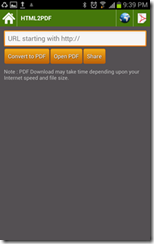
A major upgrade from last release of HTML to PDF converter for Android. One of the biggest drawback of HTML based UI is slugginess which takes away the user experience. Latest App uses Android based UI to download converted PDF file from http://www.pdf.gen.in , another improvement done is to display download progress and size of the file.

Screenshot_2012-11-09-21-39-09Screenshot_2012-11-04-15-01-15

Screenshot_2012-11-09-21-38-13Screenshot_2012-11-09-21-38-30

After download PDF file can be viewed using Open PDF button and can also be shared with different file sharing applications registered with your Android device. Previously used web interface has also been preserved and can be accessed from the top navigation bar web icon. A third icon is also available at the top navigation which can be used to view previously downloaded files. Few improvements which are to be done in upcoming version is to allow the user delete PDF files and also facility to share from PDF file listing.

HTML to PDF Converter v 2.0 can be downloaded from Android Market Place for free.