Panorama Viewer Software for Windows 7 and XP

WPanorama is a free software specially developed to view panoramic photos on your windows machine. It allows you to view panoramic images in an easy way, you can scroll horizontally or vertically on the screen. This software also comes with gorgeous 360° swiss panorama. There are many configuration settings which can be checked at the WPanorama website.

panorama-viewer-windows7

Features of WPanorama :
  - 360° continuous scrolling
  - Back and forth scrolling for non 360° pictures
  - Automatic detection of 360° panoramas
  - Horizontal and vertical scrolling
  - Multi-monitor systems support (the scrolling panoramas can span over
    several monitors)
  - Mini slide show (one sample of it included in the package)
    It is possible to display in full screen mode slide shows which aspect ratio
    is different from the one of the display
  - Mirror function for special interesting effects
  - Miscellaneous stretch filters
  - Variable scroll increment and speed
  - Extensive help with a "Question and answers" section
  - Direct access from the programs to the update on the Web

Download  WPanorama -  Panorama Viewer Software for Windows

bin to iso converter for windows7, XP

WinBin2Iso is a freeware utility which can be used to convert BIN CD images to ISO images. This utility supports files over 2GB without any problem. WinBin2Iso comes as a standalone utility and does not need to be installed before run and hence it is suitable to be carried on a small usb-stick or other memory device.

bin-to-iso-windows7

Operating systems supported by this utility are  - Windows 7, Windows Server 2008, Windows Vista, Windows 2003, Windows XP, Windows 2000, Windows Me, Windows NT, Windows 98

Features of WinBin2Iso

  • Very small program
  • Low CPU usage
  • Convert BIN CD and DVD images to ISO images
  • support BIN and ISO files over 2GB
  • Portable
  • Multilingual

Download  WinBin2Iso  - bin to iso converter for windows 7

Advanced Memory Usage Analysis Utility for Windows 7, Vista and above

Not sure which program is eating up all that precious RAM? Here is one popular RAM analyzer utility named RAMMap which gives you detailed analysis of RAM usage in your system. This utility works on windows Vista, Windows 7 and all other versions of Windows OS.

advanced-momory-usage

Detailed analysis of Memory usage is presented in different tabs which are :

  • Use Counts: usage summary by type and paging list
  • Processes: process working set sizes
  • Priority Summary: prioritized standby list sizes
  • Physical Pages: per-page use for all physical memory
  • Physical Ranges: physical memory addresses
  • File Summary: file data in RAM by file
  • File Details: individual physical pages by file

Download RAMMap – Advanced Memory tool for Windows

Uninstall IE9 From Command Prompt in Windows 7 - How to ?

Whatever is the reason you want to uninstall IE9, here are the steps you can follow to uninstall IE9 from you machine using command prompt.

Steps to Uninstall IE9 :

  • Run command prompt by right clicking on its icon and selecting Run as Administrator ( see image ).
  • Close all running IE9 browser instances.
  • Paste below command at command prompt and press enter to execute
    FORFILES /P %WINDIR%\servicing\Packages /M Microsoft-Windows-InternetExplorer-*9.*.mum /c "cmd /c echo Uninstalling package @fname && start /w pkgmgr /up:@fname /quiet /norestart"
  • IE should get removed if you are having proper permissions on the system

remove-ie9-comand-prompt

uninstall-IE-9

More information can be found Microsoft Technet website.

Similar article – how to remove IE8 from command prompt

Restore Deleted Thumbnail From Google Chrome New Tab

Accidently I deleted one of my most frequently used thumbnail “Google” and for two day’s I couldn't not find any solution until I Googled on web.  A very tricky solution to restore deleted thumbnail bookmark or the most visited bookmark from new tab.

You just need to delete another thumbnail by clicking at the right top cross icon. Similar to below picture you will see an option to “Restore all” thumbnails at the top left of the scree. Just click the restore link and arrange your thumbnail as you want.

google-chrome-restore-deleted-thumbnail

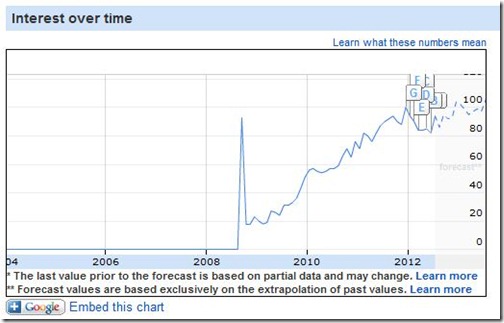
Looking back few years in Google Insight gives nice preview of the history, how  Google managed to reach among top 3 position. In earlier days we use to have one or two release of Internet Explorer in a year or two. But, now trend has changed. You now keep on getting updates automatically and don’t realize what exactly has changes ( until you are too techie and keep an eye on the chrome development).

google-chrome-google-insight

The point here is small things does matter and a smooth end user experience matters a lot to win. Although it not very critical but having an option to manage your bookmarks will definitely help a lot.

Windows 7- Disable Touchpad While Typing

This could be very annoying when you are in between typing some serious matter and suddenly the a touch on touchpad moves the cursor away or clicks something else unknowingly.  Touchfreeze is an open source utility which can be used to disable touchpad while you are typing text.

touchpad3

Download Touchfreeze – Free software to disable touchpad while typing

Google Nexus 7 May Land Into Trouble After Nokia Claims On Patent Infringement

The tablet 'Nexus 7' is the first device created for version 4.1 of Android Jelly Bean, and ASUS combines design with the latest Android OS and Google Play Entertainment .

Google_Nexus7

It is a tablet of 7-inch in size, 1280x800 pixel resolution, a Tegra processor 3 four GPU cores supported by twelve . According to the company, they will offer "the best of Google." It will also including Wi-Fi, Bluetooth, gyroscope and accelerometer. The company explains that the design 4-PLUS-1 processor extends battery life and offers maximum performance depending on the application is running. As a launch promotion, and for a limited time, the "Nexus 7" will come with $ 25 credit for Google to acquire entertainment Play .

Nokia claims the Nexus 7 infringes its patents

The Finnish company Nokia claims that Nexus 7 violates several of their licenses, particularly those related to the IEEE 802.11 Wi-Fi on. Previously the U.S. company said tablet Apple sued for patent violation.

According to the sources, Nokia said that "Nexus 7" violates 40 of its patents. The Finnish company has a list of manufacturers who access their licenses, but neither ASUS nor Google are on that list. Nokia has stated that " simply must come and register for a license . " So far neither ASUS or Google itself have wanted to speak to allegations of Nokia.